Book a time with our legal AI experts for a personalized demo of our autonomous agents. The demo itself only takes 15 minutes and you can deep dive into the use cases most relevant for you, whether it's drafting SoWs, reviewing NDAs, or completing infosec forms.
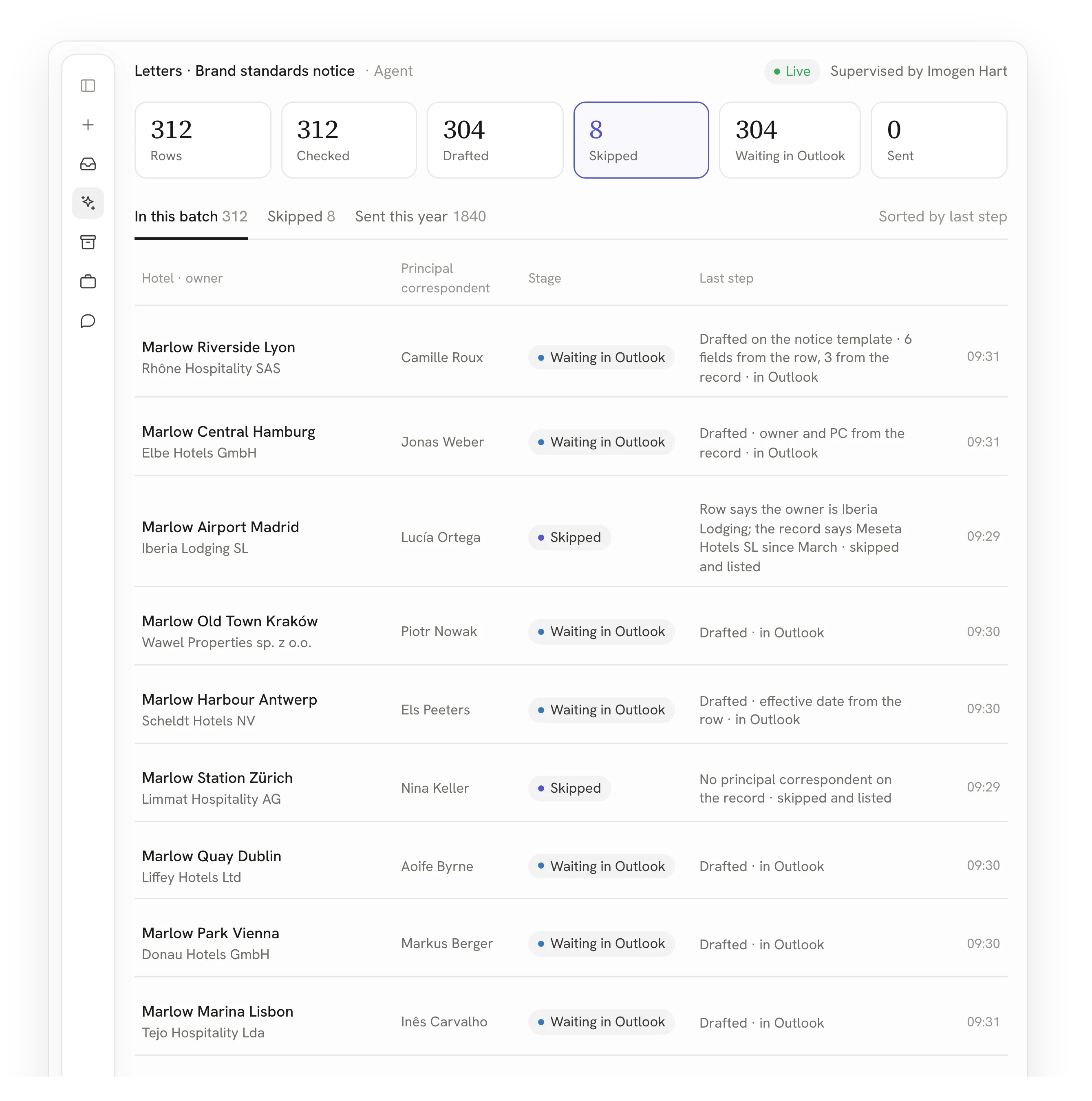
It handles the whole batch
from the spreadsheet to the drafts
The letters every legal team sends to a whole estate at once: notices of a change, renewal and price-adjustment letters, milestone and opening letters, each one the same letter with different facts, and each one checked by hand today.
One example, start to finish
Screens use fictional deal data.
Five skills, one agent,
and every step in-between
Read the list
A spreadsheet or a report, one row per counterparty, read as it arrives by email. The columns are mapped once in the design document; a row the agent cannot read is listed, not guessed.
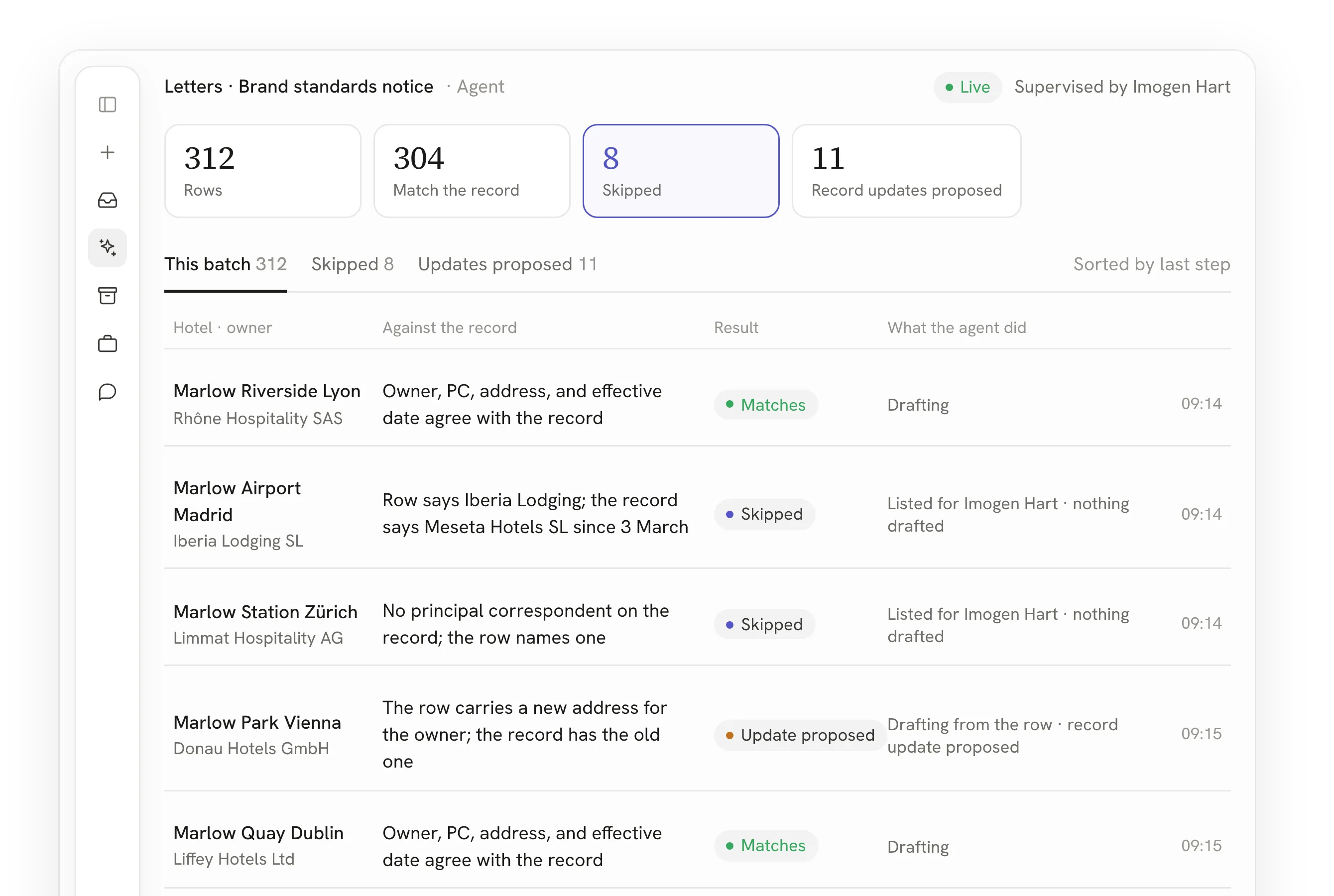
Check each row against the record
Owner, correspondent, address, agreement, and dates compared with your system of record. A row that disagrees is skipped and listed with the reason; a change a row makes is proposed to the record, never applied.
Document drafting
Each letter on your template, every field from the row, the record, or the agreement, sourced in the margin, saved as .docx and signed PDF. See the skill.
Draft the email, unsent
One email per counterparty in Outlook, addressed to the right person from the record, the letter and any schedule attached, left in Drafts for your lawyer to send.
Filing into your record
Each letter filed on its counterparty’s page at sending, with the effective date, and the batch summary kept with the skipped rows and the updates accepted. See the skill.
Skills from Flank’s library, configured to your positions, paper, and systems; what the library does not cover is built for you.
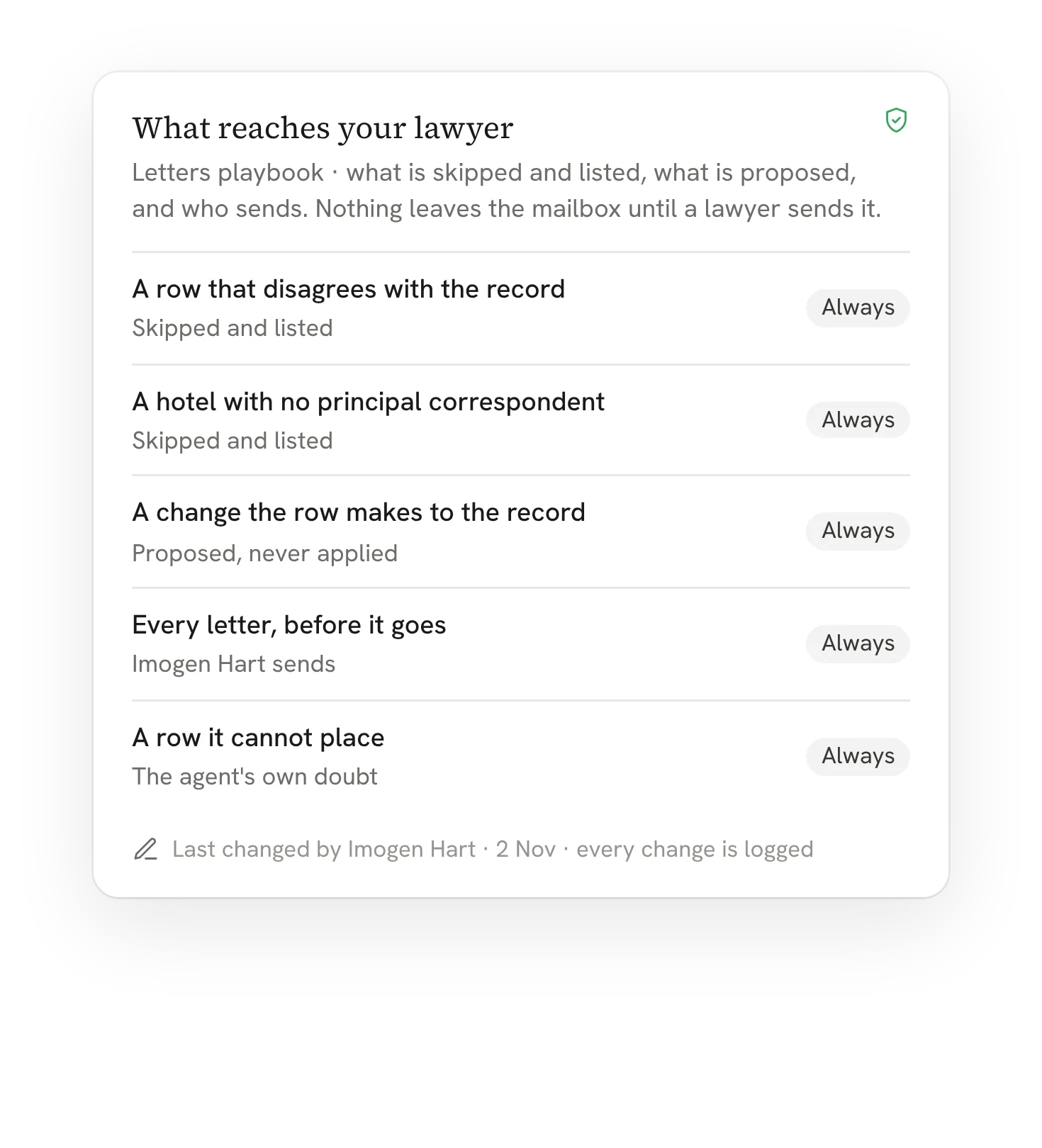
Every letter waits for your lawyer;
every doubtful row is listed
A rule you have set
What each row must match in the record before a letter is drafted: the owner, the principal correspondent, the agreement. A row that fails is skipped and listed; a change a row makes is proposed for your team to accept, never applied.
The agent’s own doubt
A row it cannot read, a hotel with no correspondent on the record, a template field it cannot fill: listed with what it found rather than guessed.
Everything else
Drafted on your template with every field sourced in the margin, addressed in Outlook, and left unsent. Your lawyer sends the folder; the agent never does.
Designed with your lawyers,
deployed by Flank
A design document, signed by both sides
Which letters, from which template, which columns map to which fields, what each row must match in the record, who the email is addressed to, and who sends: the batch as it will run.
Your playbook, written down
Written position by position, with the fallbacks, from what your lawyers already do. It changes when you change it.
A prototype on your own batch
Before anything is live, the agent runs last quarter’s batch and your lawyers compare its drafts and its skipped rows with the letters they sent.
Live, in your own environment
Your own private Flank environment in your region, zero data retention at model providers, single sign-on, an audit trail. Fees start when the agent is doing the work.
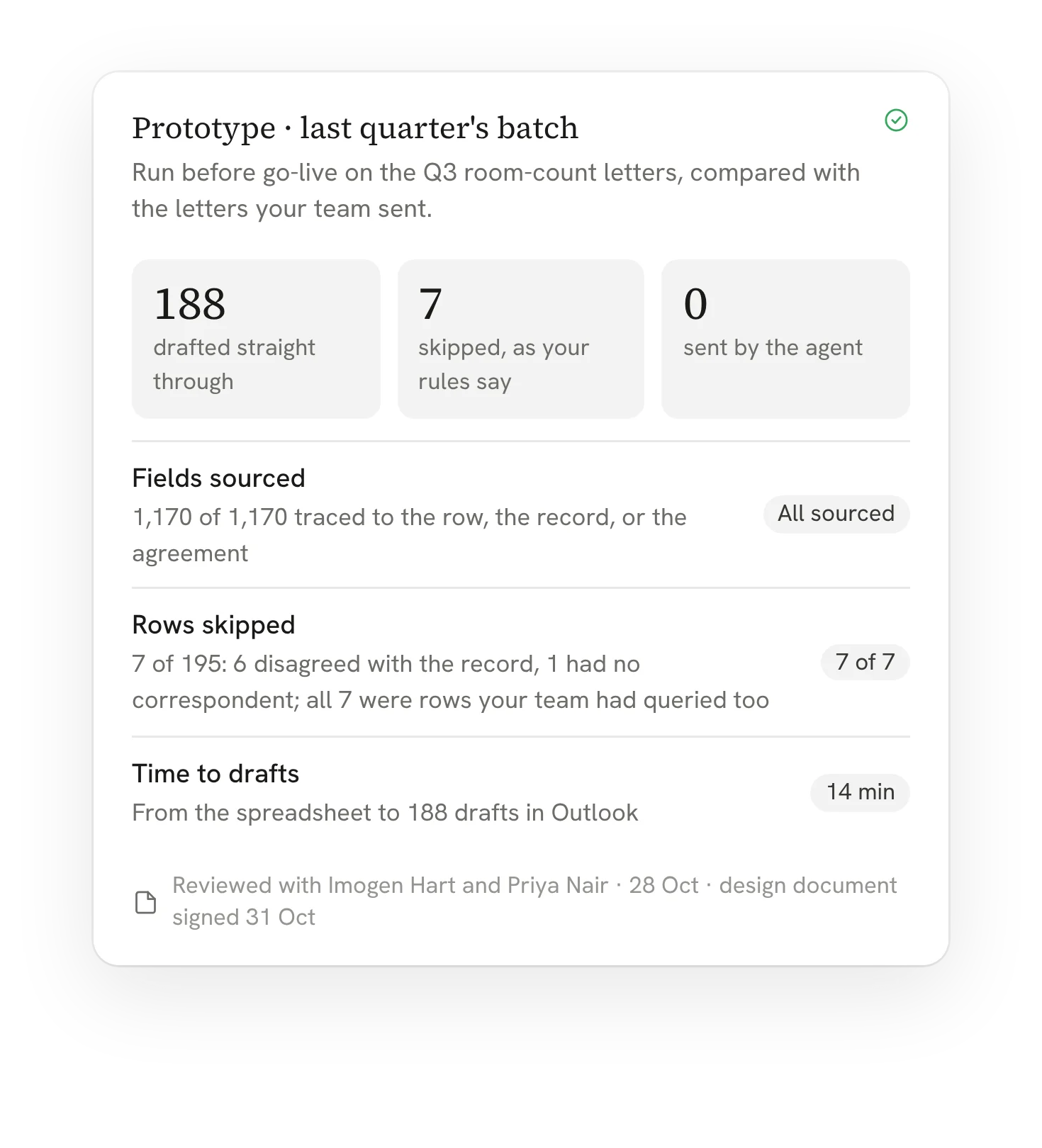
“We run it on last quarter’s batch before anyone relies on it. The lawyers read the drafts next to the letters they sent, and the skipped rows turn out to be the ones they had queried themselves.”
JS, Client Delivery Lead
Notices of a change, renewal and price-adjustment letters, milestone and opening letters, on your own templates, to your own estate. One batch, one template, the drafts in Outlook, your lawyer sends: that is what runs today; larger batches in parallel are designed per customer.
The business sends the list
as it always has
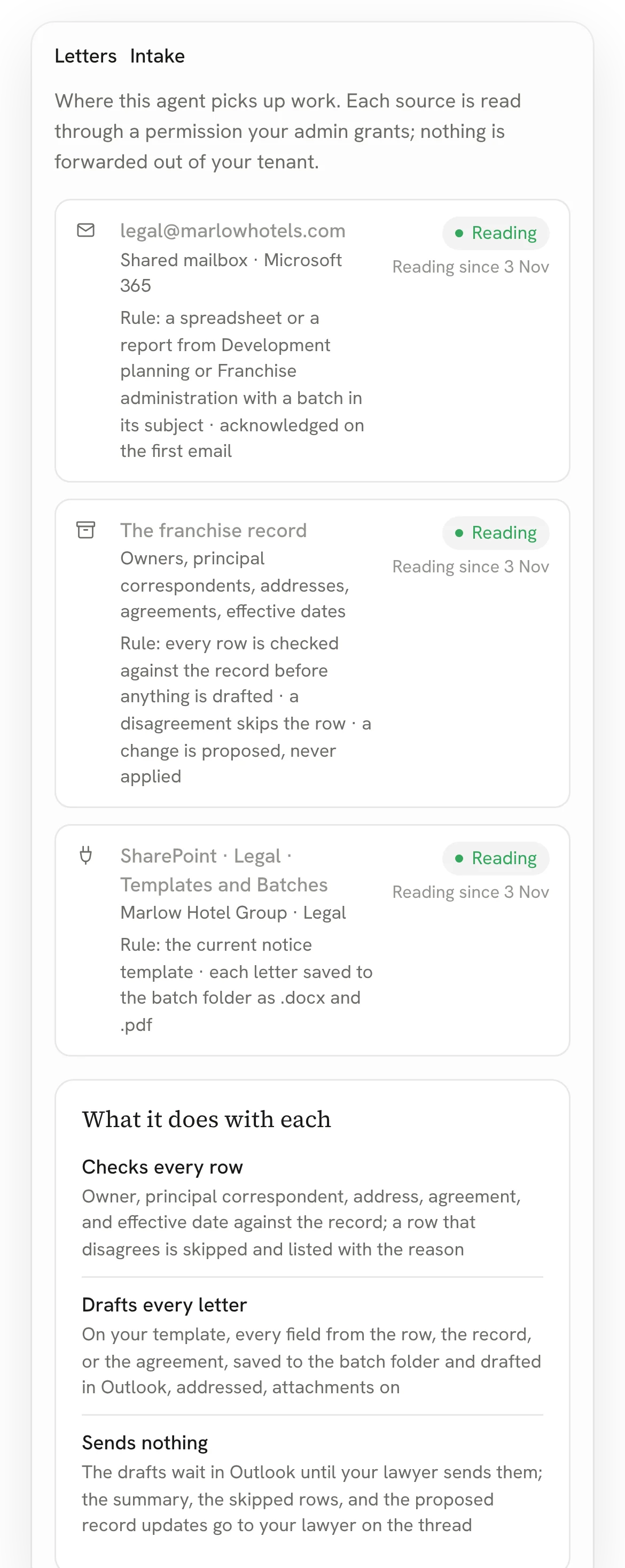
The agent reads the shared legal mailbox, your system of record, and the templates in SharePoint through permissions your admin grants. The drafts appear in Outlook, where your lawyer already works.
From the inbox
A spreadsheet or a report emailed to legal@ with a batch in its subject is picked up and acknowledged; the summary comes back on the same thread.
From the record
Owners, correspondents, addresses, and agreements are read from your system of record, so every letter is addressed from what is on file, and every disagreement is seen.
Into Outlook
Each email is drafted in the shared mailbox, addressed, attached, and left in Drafts; your lawyer sends from where they already are.
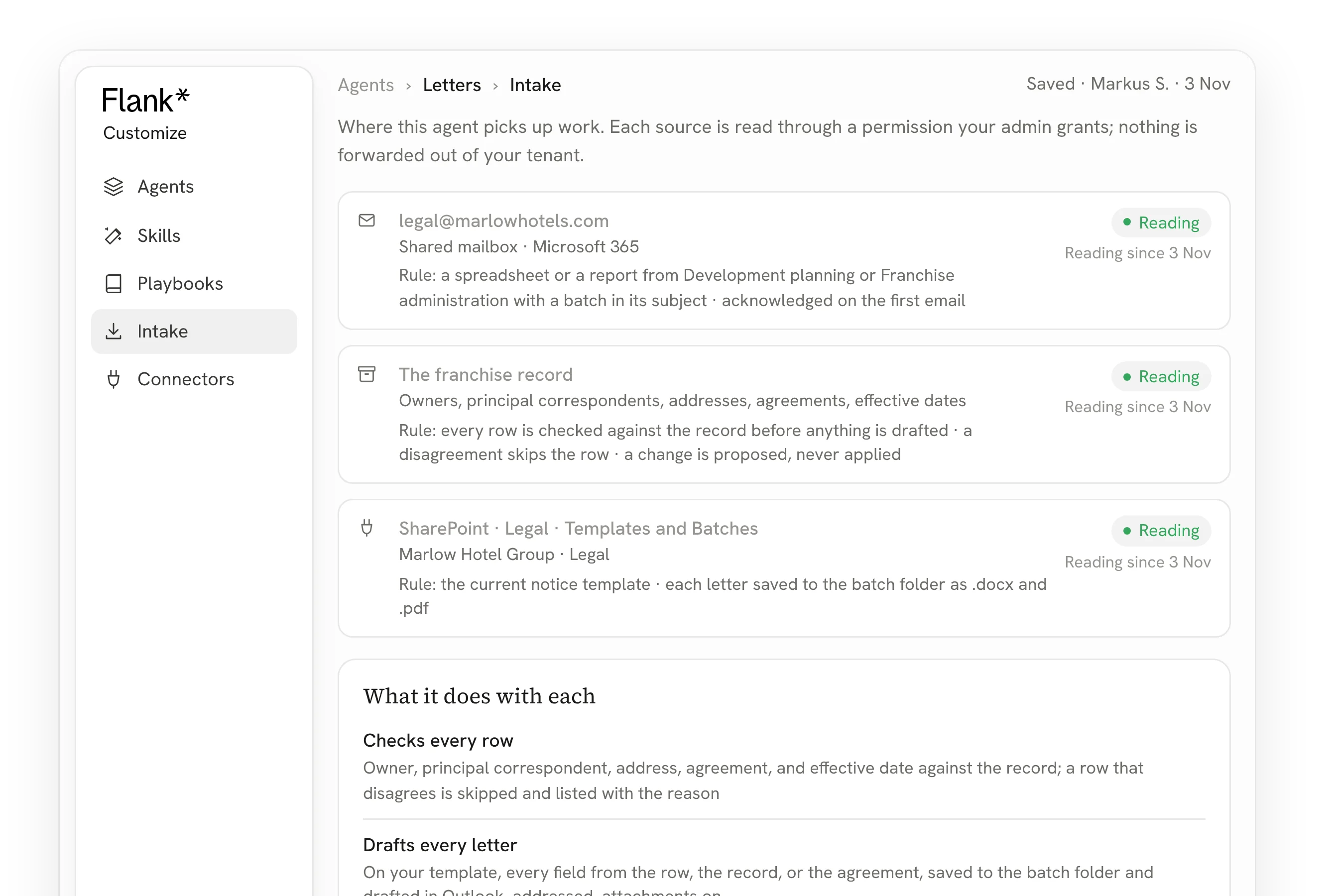
Connectors carry the work through the tools you run: the list and the drafts in Outlook, the letters in Word and SharePoint, the counterparties in your CLM, your franchise system, or the Flank Record. One not shown here is built for you.








The questions we get asked first
If yours is not here, bring it to the call.
Does the agent ever send a letter?
No. Every email is drafted in the shared mailbox and left in Drafts, addressed and attached, and your lawyer sends the folder. The design document can name a second reviewer before sending; it cannot give the agent the send.
What if a row and the record disagree?
The row is skipped and listed with the reason, and nothing is drafted for it. Where the row carries a change, the change is proposed to the record for your team to accept or query; the record is never changed by the agent.
Which letters can it do?
Any letter that is the same letter with different facts: a notice under a clause, a renewal or price-adjustment letter, a milestone or opening letter. Each kind has its own template and its own rules for what a row must match, set in the design document.
How big a batch?
One batch at a time, one template, as many rows as the list has; the drafts for several hundred letters take minutes. Several large batches running at once are designed and timed per customer rather than switched on.
Who is responsible for a letter that is wrong?
Your lawyers stay responsible for the legal positions, as they are today. Every field is sourced in the margin, every doubtful row is listed rather than drafted, and no letter leaves the mailbox until your lawyer sends it. Flank is accountable for the agent doing the work as designed.
What happens to the record afterwards?
Each letter is filed on its counterparty’s page at sending, with the effective date, so the next batch starts from a record the last one corrected.
What happens next
Bring us last quarter’s batch
We’ll show you the agent at work
One call, then a prototype on your own template and a batch you have already sent, so your lawyers see what it drafts and what it skips before anything is live.

From the spreadsheet to the drafts
Notices, renewal and price letters, milestone letters: the same letter with different facts, each checked by hand today.
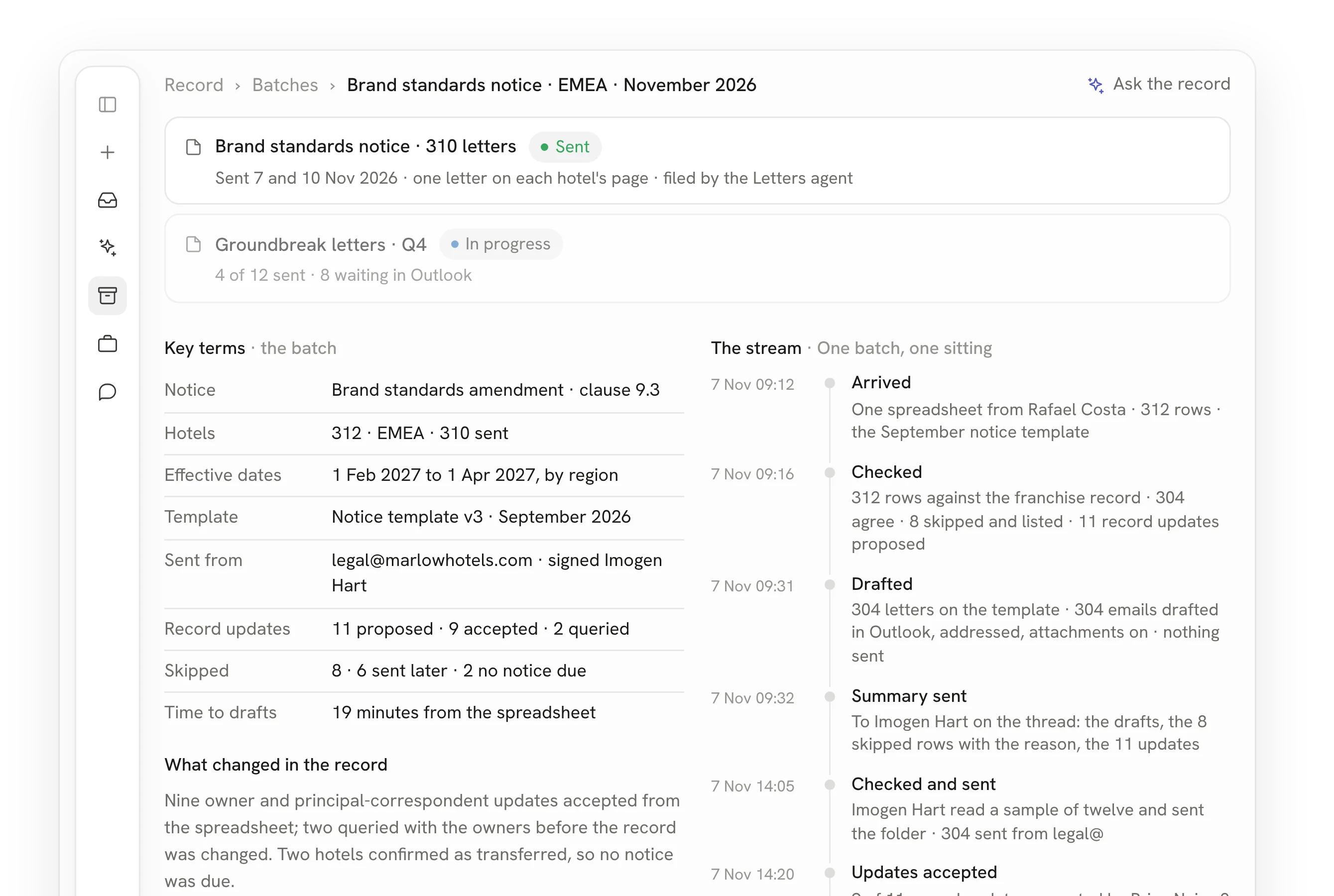
One example, start to finish
01Arrives
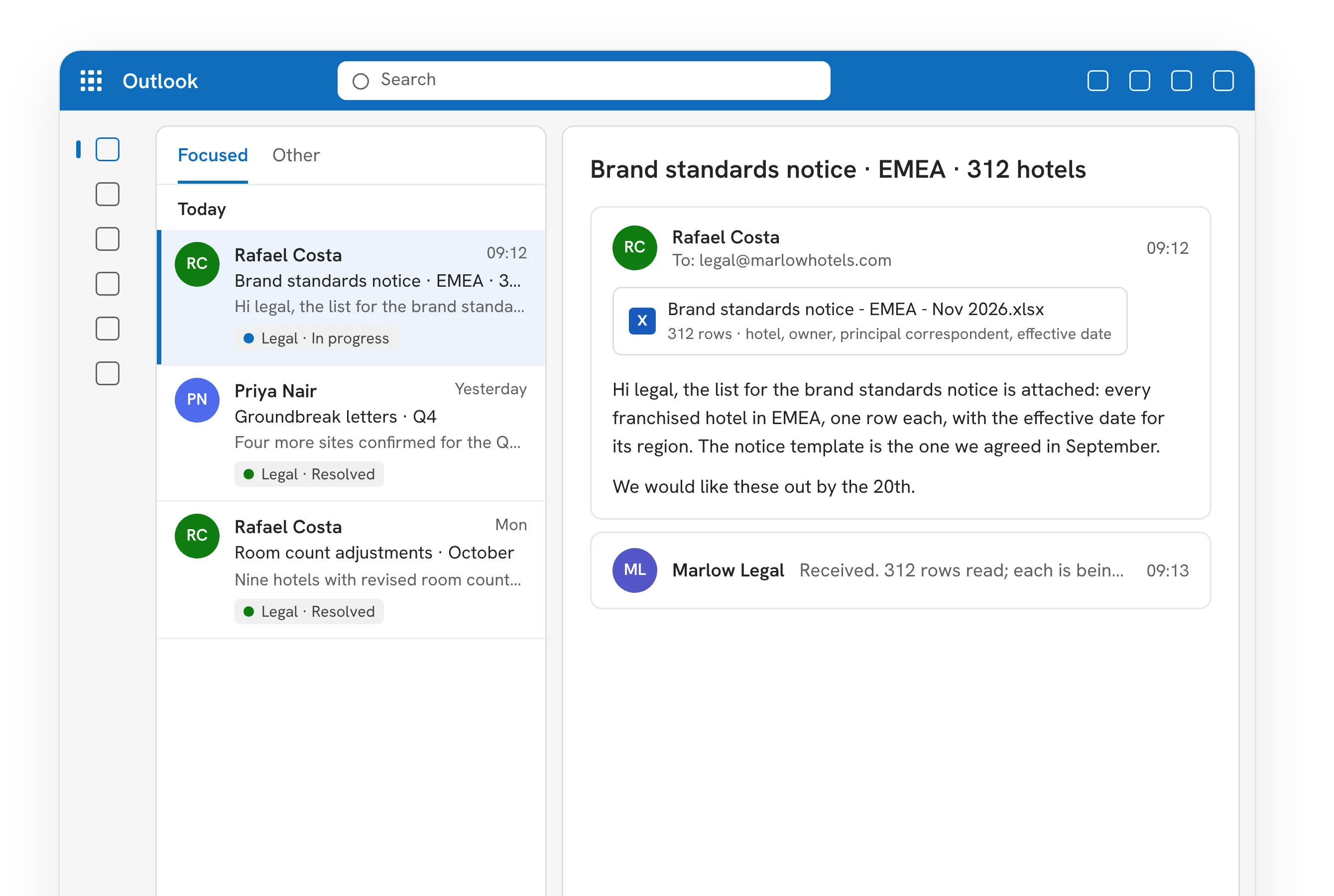
Development · 09:12
Development planning emails legal one spreadsheet: every hotel in the region, one row each, with the effective date.
02Checked
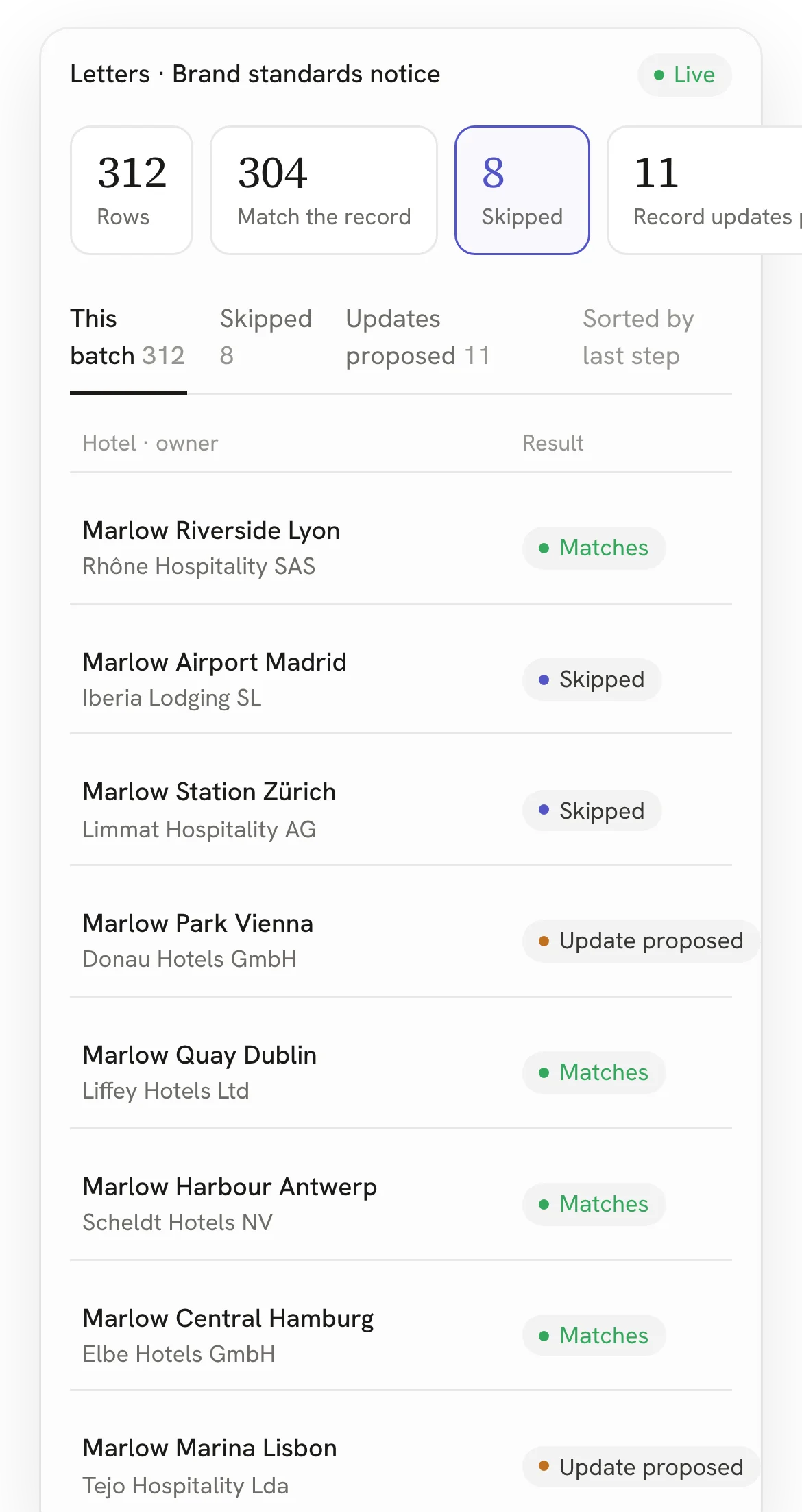
Agent · 09:16
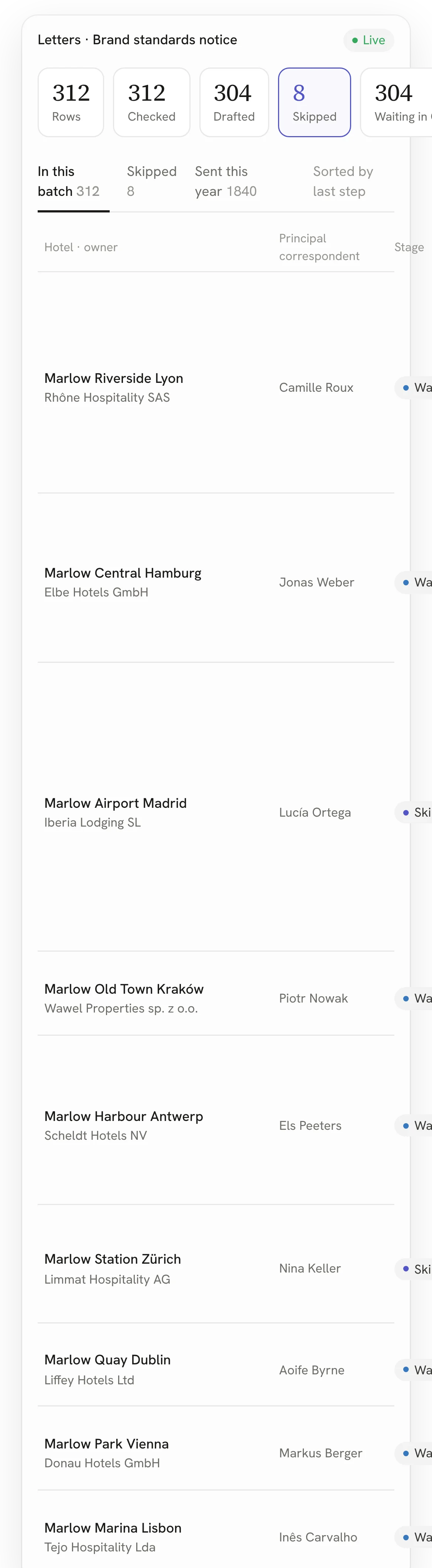
Every row checked against the record. 304 agree; eight are skipped and listed with the reason; eleven record updates are proposed, never applied.
03Drafted
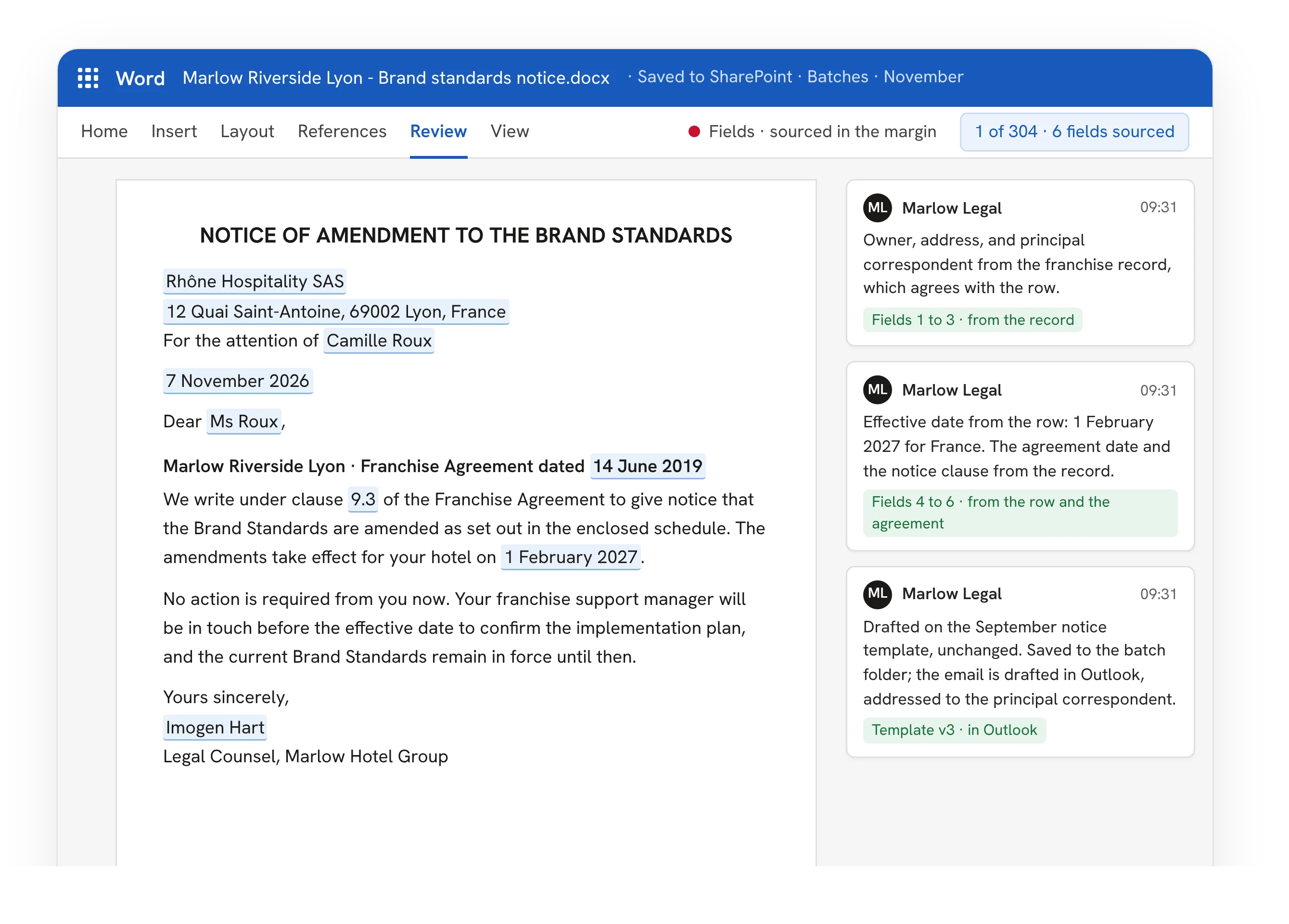
Agent · 09:31
A letter for each of the 304 hotels on your template, every field sourced in the margin. Nineteen minutes from the spreadsheet.
04Checked and sent
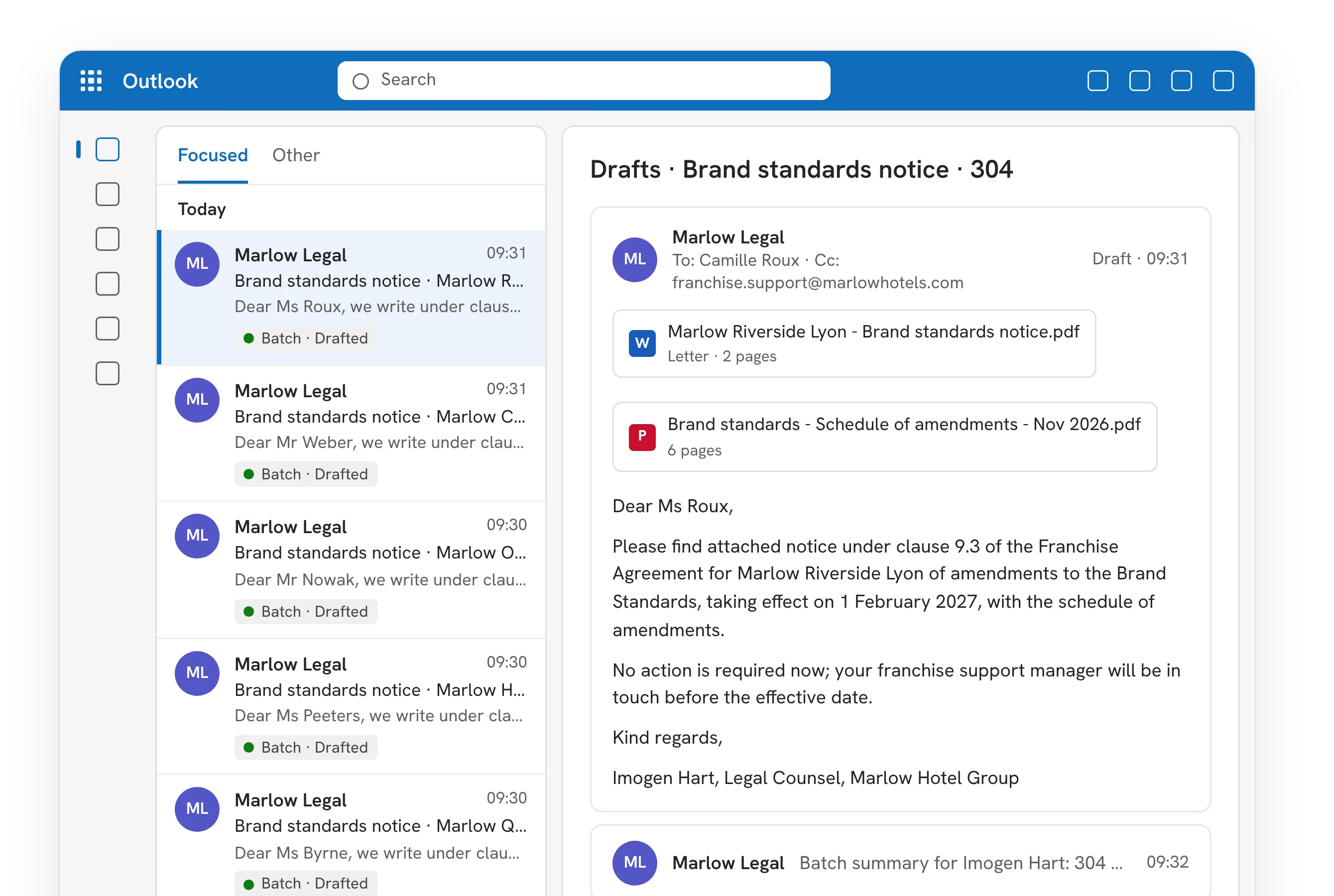
Your lawyer
The 304 emails wait in Drafts, addressed, with the letter attached. Your lawyer reads a sample and sends the folder. The agent sends nothing.
05Recorded
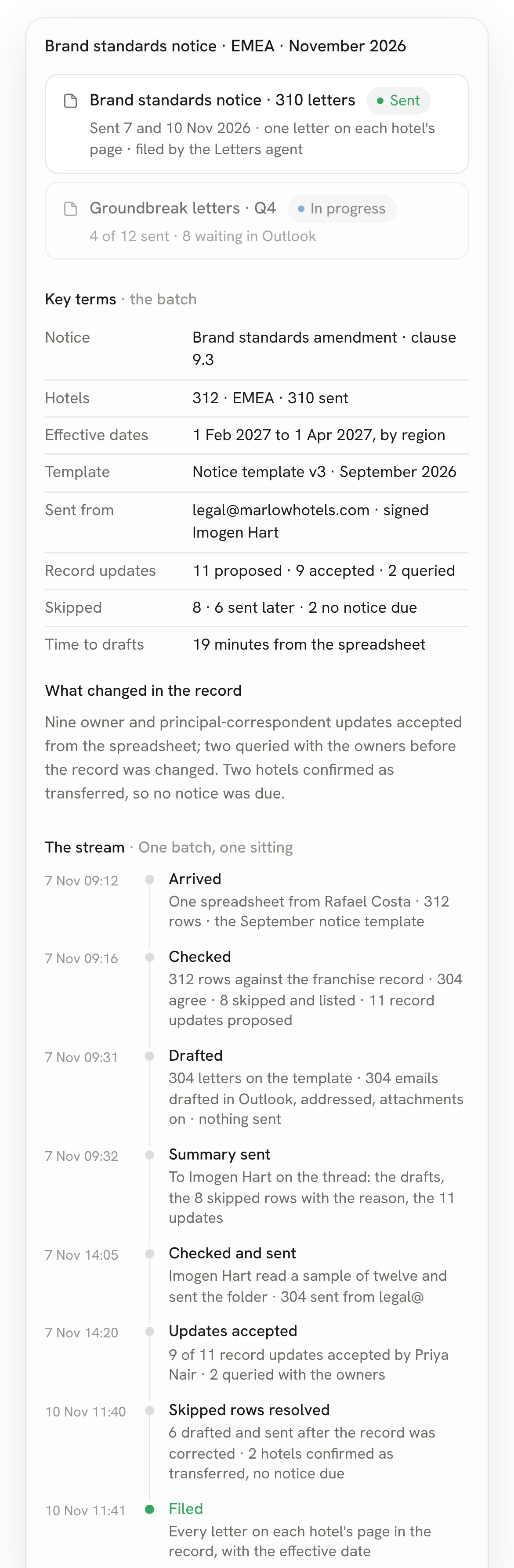
Agent
Each letter is filed on its hotel’s page with the effective date; your team accepts or queries the proposed updates.
Swipe for the five stages. Screens use fictional deal data.
Five skills, one agent, every step in-between
Read the list
One row per counterparty, by email; an unreadable row is listed, not guessed.
Check each row against the record
A disagreement skips the row; a change is proposed, never applied.
Document drafting
Each letter on your template, every field sourced. See the skill.
Draft the email, unsent
Addressed, attached, left in Drafts for your lawyer.
Filing into your record
Each letter on its counterparty’s page at sending. See the skill.
Every letter waits for your lawyer
A rule you have set
What a row must match before a letter is drafted; a change to the record is proposed, never applied.
The agent’s own doubt
A row it cannot read or place: listed, not guessed.
Everything else
Drafted, sourced, addressed, and left unsent for your lawyer.
Built with your lawyers,
deployed by Flank
A design document, signed by both sides
Which letters, which template, what each row must match, who sends.
Your playbook, written down
Position by position, with the fallbacks, from what your lawyers already do.
A prototype on your own batch
Last quarter’s batch, before anything is live.
Live, in your own environment
Your region, zero data retention at model providers, single sign-on, an audit trail. Agent fees start when it is live and doing the work.
“We run it on last quarter’s batch before anyone relies on it. The skipped rows turn out to be the ones the lawyers had queried themselves.”
JS, Client Delivery Lead
One batch, one template, the drafts in Outlook, your lawyer sends: that is what runs today.
The business sends the list as it always has
The shared legal mailbox, your record, and your templates, through permissions your admin grants.
From the inbox
A spreadsheet emailed to legal@ is picked up; the summary comes back on the thread.
From the record
Every letter addressed from what is on file; every disagreement seen.
Into Outlook
Drafted, addressed, attached, left in Drafts for your lawyer to send.
Connectors are built per system; one not shown here is built for you.
The questions we get asked first
Does the agent ever send a letter?
No. Every email is left in Drafts, addressed and attached, and your lawyer sends the folder.
What if a row and the record disagree?
The row is skipped and listed with the reason. A change the row carries is proposed to the record, never applied.
Which letters can it do?
Any letter that is the same letter with different facts, each kind with its own template and rules.
How big a batch?
One batch at a time, one template, as many rows as the list has. Several large batches at once are designed per customer.
Who is responsible for a letter that is wrong?
Your lawyers stay responsible for the legal positions. Every field is sourced, every doubtful row listed, and no letter leaves until they send it. Flank is accountable for the agent doing the work as designed.
What happens to the record afterwards?
Each letter is filed on its counterparty’s page at sending, with the effective date.