Book a time with our legal AI experts for a personalized demo of our autonomous agents. The demo itself only takes 15 minutes and you can deep dive into the use cases most relevant for you, whether it's drafting SoWs, reviewing NDAs, or completing infosec forms.
Agents behind the systems you already run
Work arrives where it always has. An agent does it, and your lawyers see only what they asked to see.
 Shared legal inbox
 Jira
 SharePoint portal
 E-signature
Intake rules
MSA agent
- Draft MSA + Order Form
- Counter-redline customer markup
- Deck to Order Form
Vendor SaaS agent
- Subscription terms to the vendor playbook
- Renewals and price increases
- Filing into your record
Third-party paper agent
- First-pass review to the playbook
- List of differences from a PDF
Lawyer’s check
Reply on the thread
Redlined .docx
Systems updated
Filed in the record
Shared legal inboxAccepted proposal
Intake rules
Order Forms and renewals
MSA agent
- Deck to Order Form
 WordRecord
 HubSpot
NBNadia Brooks
Payment terms: 45 days offered, 30 approved
ApproveApproved
Reply on the thread
Order Form attached
Systems updated
Deal updated in HubSpot
JiraSupplier’s MSA to review
Intake rules
Supplier paper
Third-party paper agent
- First-pass review to the playbook
WordPDFSharePointNBNadia Brooks
Clause 11.2 leaves liability uncapped
ApproveApproved
Redlined .docx
Changes tracked in Word
Reply on the thread
Redline attached
No check neededE-signatureWordPlaybookRecord
E-signatureSigned agreement
Intake rules
Signed agreements
Vendor SaaS agent
- Filing into your record
WordPlaybookRecordFiled in the record
Agreement and its terms
Systems updated
Your CLM kept current
Each agent is written for your team’s work, around your templates, playbook, and rules, in Flank Studio.
Flank Studio
 Studio
 builds swarms of agents
from natural language, in minutes
Our forward deployed team writes each agent from a design document your lawyers sign. A working prototype in hours.
See Flank StudioWrite instructions in natural language
Hundreds of agents are live today, using skills from the Flank Library, including Contract review, Triage, Document drafting, Filing into your record, or written from scratch in Studio.
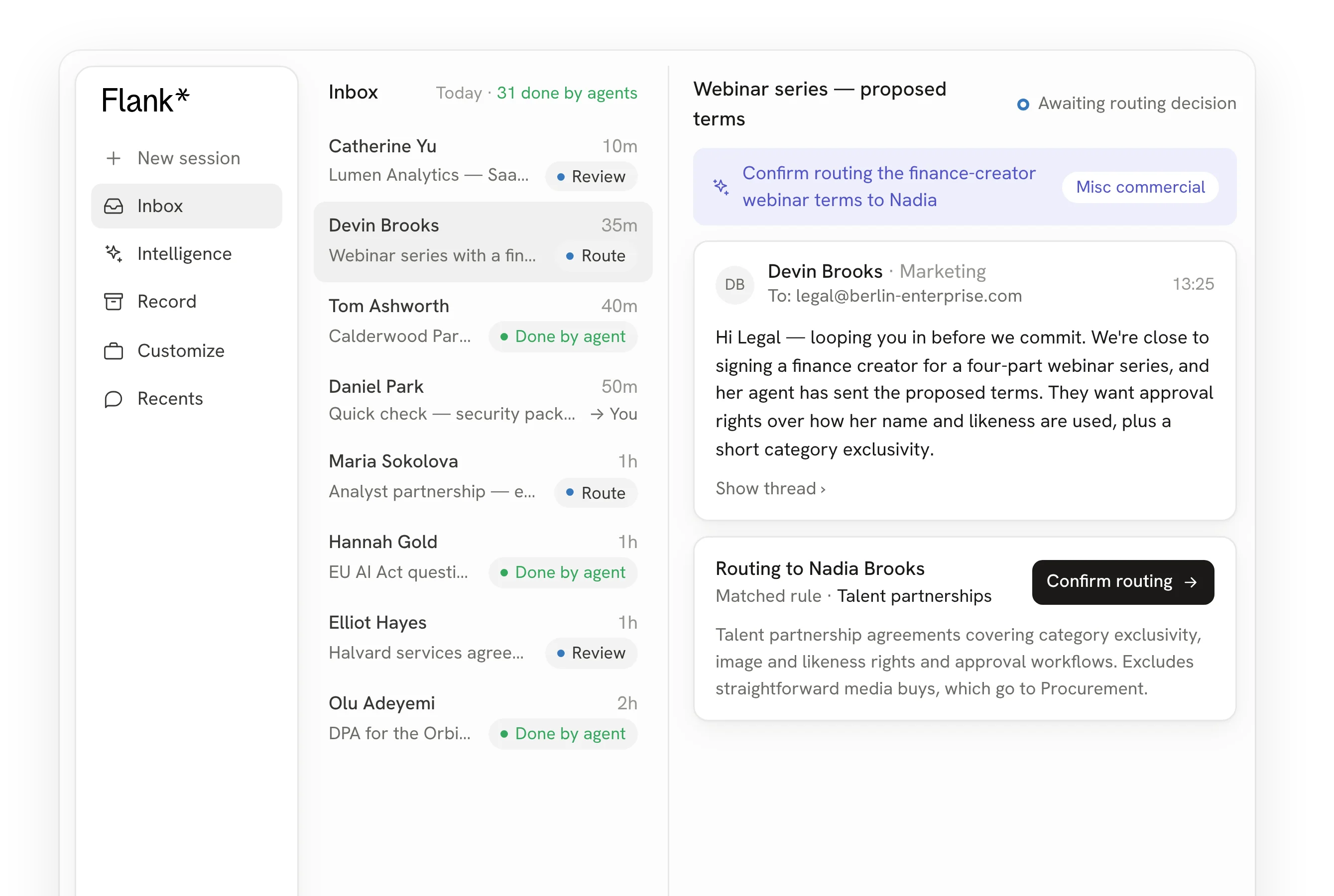
One Inbox for everything sent to legal
Your team can see every request in the Flank Inbox, while the business works as usual.
Permissions, action by action
You can decide what your agents can (or cannot!) do with simple switches.
Tool permissions
HubSpot2 of 4 on
ReadFind a deal by company
WriteUpdate a deal’s fields
WriteMove a deal to a new stageSwitched off by Markus S. · 2 Oct
DeleteDelete a deal
SharePointRead 4 of 4Write 2 of 2Delete 0 of 2
DocuSignRead 2 of 2Write 1 of 1Delete 0 of 1
Flank RecordRead 5 of 5Write 3 of 3Delete 0 of 1
Per connector
Flank agents only take actions in your systems that you allow them to. By default, they cannot do anything until given permission.
Across every skill
There is a switch for everything. You don’t want an agent to comment on a Word document? Fine. No use of MS Teams at all? Done.
Admins only
Only your admins change these settings. The change, who made it, and when are all kept on record for auditable confidence.
Your lawyers decide what it does alone
and what comes back to them
Hold every run, or only the points the instructions, the playbook, or the agent’s own doubt raise.
Most runs never cross this line
NBNadia BrooksYour lawyer
Clause 11.2 leaves liability uncapped
ApproveEditRevertApproved
Request arrives
Vendor SaaS terms, by email
Term
Three years, within position
Liability cap
Uncapped
Governing law
England and Wales
Sent
Redline on the thread
What waits for a lawyer
Each @Approval in the skill, each point the playbook sends to a lawyer, and anything the agent is unsure of.
Who approves it
Named lawyers per agent, emailed when something is held, deciding in email or Word where they already work.
What they see
Each flag says what raised it, with the clause beside it, and nothing is sent until a lawyer approves, edits, or reverts.
Flank Record
Filed at signature
Each executed agreement is read and filed with its key terms, each traced to its clause and page.
Asked in plain language
Ask in Teams, Slack, or email, and the agent answers from the record.
In front of your CLM
Keep the CLM you run and let agents keep it current, or let Flank Record be the record.
In a private environment, in the tools
your team already uses
Your own private Flank environment in your region, connected to Microsoft 365 with the permissions your admin grants, and nothing retained by model providers.




The questions we get asked first
If yours is not here, bring it to the call.
Most are tools a lawyer opens and prompts. A Flank agent is written in plain language from a design document you sign, and tested before it is live.
An assistant answers whoever is typing. A Flank agent follows the design document you signed, is tested against outputs your lawyers approved, and is kept working by Flank, with permissions per action, named approvers, and an audit trail.
A custom build is software written for you and yours to maintain. A Flank agent is configured on one platform, and our engineers keep improving the platform beneath it.
A working prototype on your own documents can be spun up in hours. A live agent takes six to eight weeks on a contained scope.
Your lawyers sign the design document and decide the points an agent holds, in the email and Word they already use. Your admins set permissions. Nobody outside legal learns a new tool. Implementation has the rest.
A new skill is written in Studio with its own tests; a tool or connector the platform lacks is built, usually within a day.
No. A platform is a tool your lawyers use. A Flank agent is a stream of work done, from where it arrives to where it is filed.
In your own private Flank environment, in your region. Documents and the record stay there, model providers retain nothing, and every check, decision, and reply is on an audit trail.
Yes, within what you have signed off: who approves each agent’s work, which checks are held for a lawyer, what each skill may do. Changes to the playbook are decisions your team makes.
What happens next
Bring us a stream of work
We’ll show you the agent at work
A call, then a design document signed by both sides, then a prototype on your own paper before anything goes live.

Agents behind the systems you already run
Requests arrive where they always have. The agent does the work; your lawyers see only what they asked to.
Sales sends an accepted proposal
Shared legal inboxAccepted proposal
Intake rules
Order Forms and renewals, to the MSA agent
MSA agent
- Deck to Order Form
WordRecordHubSpotNBNadia BrooksApproved
Payment terms: 45 days offered, 30 approved
Reply on the thread
Order Form attached
Systems updated
Deal updated in HubSpot
A supplier sends its own contract
JiraSupplier’s MSA to review
Intake rules
Supplier paper, to the Third-party paper agent
Third-party paper agent
- First-pass review to the playbook
WordPDFSharePointNBNadia BrooksApproved
Clause 11.2 leaves liability uncapped
Redlined .docx
Changes tracked in Word
Reply on the thread
Redline attached
A signed agreement comes back
E-signatureSigned agreement
Intake rules
Signed agreements, to the Vendor SaaS agent
Vendor SaaS agent
- Filing into your record
WordPlaybookRecordNo check needed
Filed in the record
Agreement and its terms
Systems updated
Your CLM kept current
Each agent is written for your team’s work, around your templates, playbook, and rules, in Flank Studio.
Flank Studio
Studio
Studio builds swarms of agents in minutes
From natural language. Our forward deployed team writes each agent from a design document your lawyers sign.
See Flank StudioWrite instructions in natural language
Deck to Order Form, one of the MSA agent’s skills, as Studio wrote it.
Written from your design document
Studio drafts each skill from the document you signed.
Names the tools it can use
Each @ is a tool or a system the skill is allowed to use.
Escalations are described
@Approval is where the work stops for a lawyer.
Tested before it is live
A skill is published only when its tests pass.
Hundreds of agents are live today, using skills from the Flank Library, including Contract review, Triage, Document drafting, Filing into your record, or written from scratch in Studio.
One Inbox for everything sent to legal
Your team can see every request in the Flank Inbox, while the business works as usual.
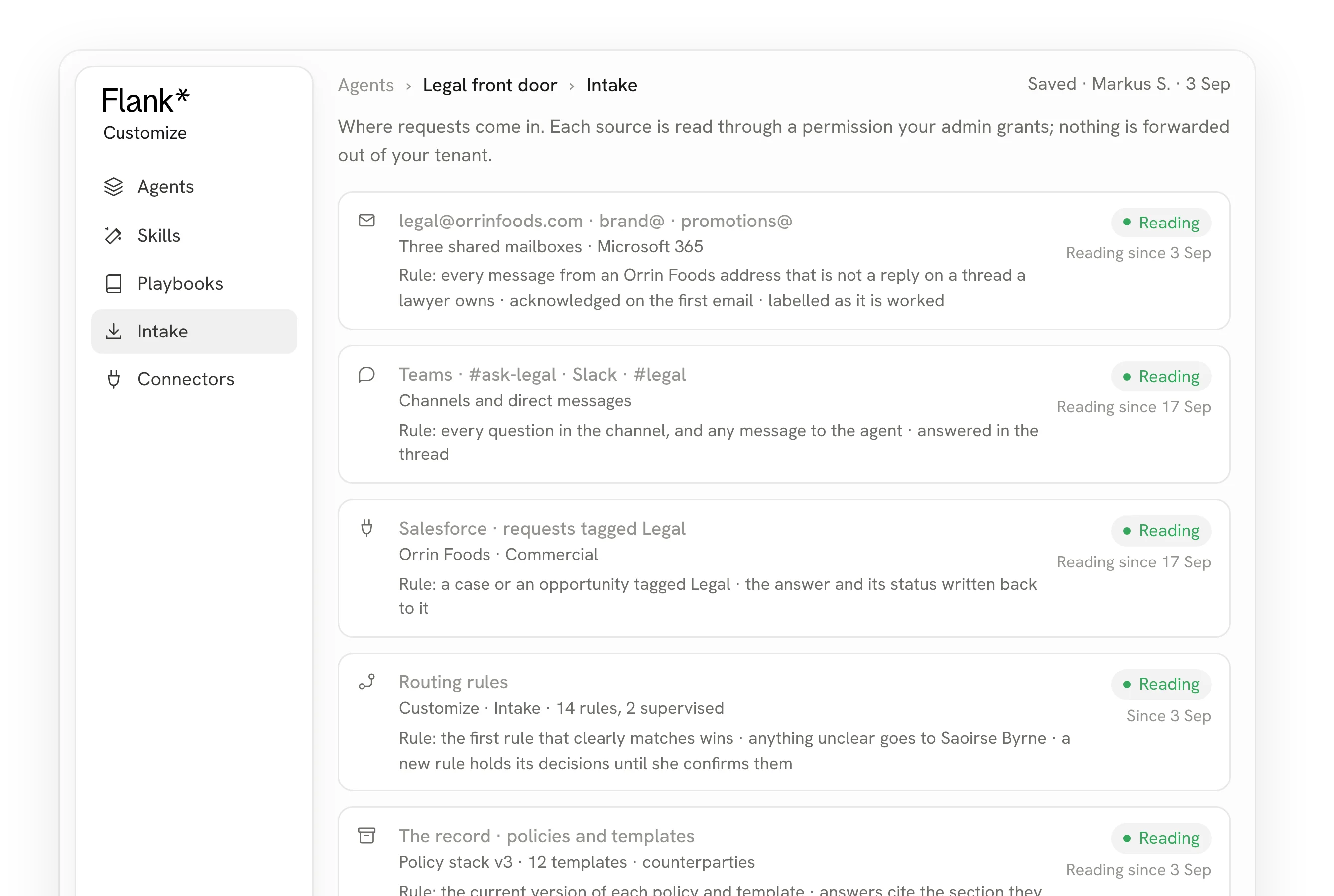
Intake, by your rules
Plain-language rules send each request to an agent, a lawyer, or an outside address.
Where every request stands
Every request, with where it stands. Route one by hand and tick Remember to make it a rule.
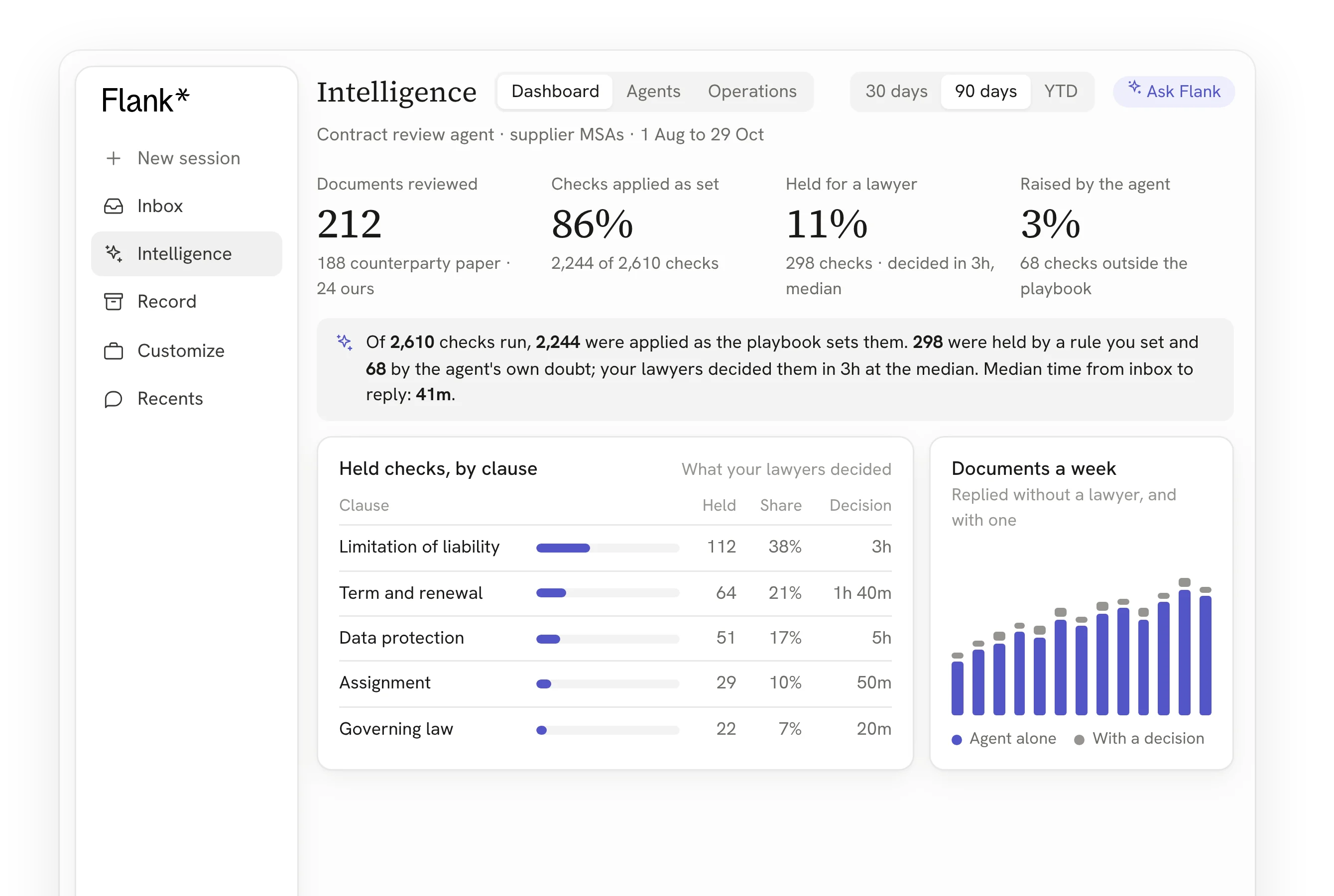
Intelligence
Ninety days of demand: volume, the share agents handled, resolution time, demand by kind.
Permissions, action by action
You can decide what your agents can (or cannot!) do with simple switches.
Tool permissions
What any skill may do, per connector.
HubSpot4 of 6 on
ReadFind a deal by company
ReadRead a deal’s fields and attachments
ReadRead the contact on a deal
WriteUpdate a deal’s fields
WriteMove a deal to a new stageSwitched off by Markus S. · 2 Oct
DeleteDelete a deal
SharePointRead 4 of 4Write 2 of 2Delete 0 of 2
DocuSignRead 2 of 2Write 1 of 1Delete 0 of 1
OutlookRead 3 of 3Write 2 of 2Delete 0 of 1
Flank RecordRead 5 of 5Write 3 of 3Delete 0 of 1
Per connector
Flank agents only take actions in your systems that you allow them to. By default, they cannot do anything until given permission.
Across every skill
There is a switch for everything. You don’t want an agent to comment on a Word document? Fine. No use of MS Teams at all? Done.
Admins only
Only your admins change these settings. The change, who made it, and when are all kept on record for auditable confidence.
Your lawyers set what comes back to them
Hold every run, or only the points a rule you set or the agent’s own doubt raise.
NBNadia BrooksYour lawyer
Clause 11.2 leaves liability uncapped
ApproveEditRevertApproved
Request arrives
Vendor SaaS terms, by email
Term
Three years, within position
Liability cap
Uncapped
Governing law
England and Wales
Sent
Redline on the thread
What waits for a lawyer
Every run if you choose; otherwise each @Approval, each point the playbook sends to a lawyer, and anything the agent is unsure of.
Who approves it
Named lawyers per agent, deciding in email or Word.
What they see
Each flag says what raised it, with the clause beside: approve, edit, or revert.
One record of every contract, kept by agents
Where agents file what they finish: every agreement at signature, its terms traced to the clause.
Filed at signature
Each executed agreement is read and filed with its key terms, each traced to its clause and page.
Asked in plain language
Ask in Teams, Slack, or email, and the agent answers from the record.
In front of your CLM
Keep the CLM you run and let agents keep it current, or let Flank Record be the record.
In a private environment, in your tools
Your own private Flank environment in your region, connected to Microsoft 365, with nothing retained by model providers.
The questions we get asked first
If yours is not here, bring it to the call.
How is Flank different from other legal AI products?
Most are tools a lawyer opens and prompts. A Flank agent is written in plain language from a design document you sign, and tested before it is live.
Why not a general AI assistant?
An assistant answers whoever is typing. A Flank agent follows the design document you signed, is tested, and is kept working by Flank, with permissions, named approvers, and an audit trail.
How is this different from a custom build?
A custom build is software written for you and yours to maintain. A Flank agent is configured on one platform, and our engineers keep improving the platform beneath it.
How long until an agent is live?
A working prototype on your own documents in hours; a live agent in six to eight weeks on a contained scope.
What does our team have to do?
Your lawyers sign the design document and decide the points an agent holds, in the email and Word they already use. Your admins set permissions. Nobody outside legal learns a new tool. Implementation has the rest.
What if we need something the platform does not do?
A new skill is written in Studio with its own tests; a tool or connector the platform lacks is built, usually within a day.
We already have a legal AI platform. Does this replace it?
No. A platform is a tool your lawyers use. A Flank agent is a stream of work done, from where it arrives to where it is filed.
Where does our data sit?
In your own private Flank environment, in your region. Documents and the record stay there; model providers retain nothing.
Can our own team change what an agent does?
Yes, within what you have signed off: who approves each agent’s work, which checks are held for a lawyer, what each skill may do. Changes to the playbook are decisions your team makes.